Integration patterns
Integration based on OData
OData entity actions can be used to integrate with external apps. There are following OData entity actions available:
Dox42IntegrationProfileEntity_SF data entity (public name Dox42IntegrationProfiles_SF):
runRequest: runs request with no result returned (allows to run request synchronously and asynchronously).
runRequestAndGetReportFileUrl: runs request synchronously and returns the report file URL.
runRequestAndGetReportFileUrlList: runs request synchronously and returns the report files as a list of URLs (allows to return more than one file if needed).
runRequestAndGetReportFileBase64: runs request synchronously and returns the report file as Base64 encoded string.
runRequestAndGetReportFileBase64List: runs request synchronously and returns the report files as a list of Base64 encoded strings (allows to return more than one file if needed).
runRequestAndGetReportTransaction: runs request synchronously and returns the report transaction id used as an input parameter in the dox42 template.
runRequestAndGetReportTransactionList: runs request synchronously and returns a list of the report transaction ids (allows to return more than one report transaction id if needed).
To be able to call the entity actions, the security role “dox42 integration OData services consumer” (Dox42IntegrationODataServiceConsumer_SF) should be applied.
For example, this approach can be used to integrate with Microsoft Power Automate:
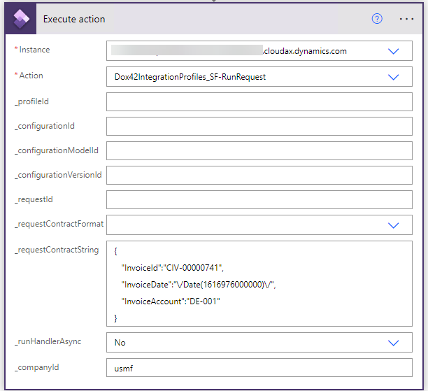
Integration with Microsoft Power Automate
Integration based on custom services
Custom service methods can be used to integrate with external apps. There are following custom service methods available:
Dox42IntegrationServices_SF service group, “Dox42IntegrationService_SF” service name, operations:
runRequest: runs request with no result returned (allows to run request synchronously and asynchronously).
runRequestAndGetReportFileUrl: runs request synchronously and returns the report file URL.
runRequestAndGetReportFileUrlList: runs request synchronously and returns the report files as a list of URLs (allows to return more than one file if needed).
runRequestAndGetReportFileBase64: runs request synchronously and returns the report file as Base64 encoded string.
runRequestAndGetReportFileBase64List: runs request synchronously and returns the report files as a list of Base64 encoded strings (allows to return more than one file if needed).
runRequestAndGetReportTransaction: runs request synchronously and returns the report transaction id used as an input parameter in the dox42 template.
runRequestAndGetReportTransactionList: runs request synchronously and returns a list of the report transaction ids (allows to return more than one report transaction id if needed).
To be able to call the custom service methods, the security role “dox42 integration custom services consumer” (Dox42IntegrationCustomServiceConsumer_SF) should be applied.
For example, calling JSON based custom service:
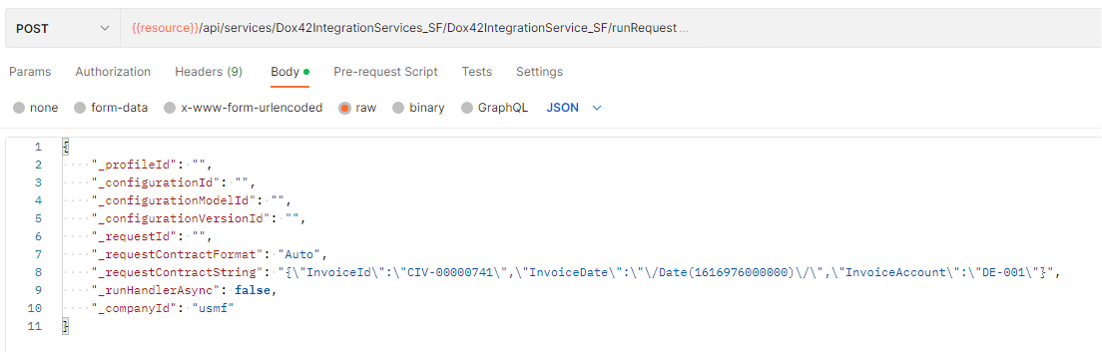
Calling JSON based custom service