To make your data available in the document template, you have to add one or more data sources to the document template’s data map.
Basic and additional data sources
dox42 offers basic data sources which are automatically provided with your dox42 Add-In installation. In addition to that, there are additional data sources which enable access to specific data sources or systems. The additional data source is developed and licensed as an additional module by dox42 and, once purchased, must first be added to the dox42 Add-In before it can be used.
Follow the specific instructions provided for each data source to find out how to add an additional data source to the dox42 Add-In.
Prerequisites
Steps
In Microsoft Word or Excel, go to the dox42 ribbon and select Data Map.

dox42 ribbon
The Data Map Designer window opens.
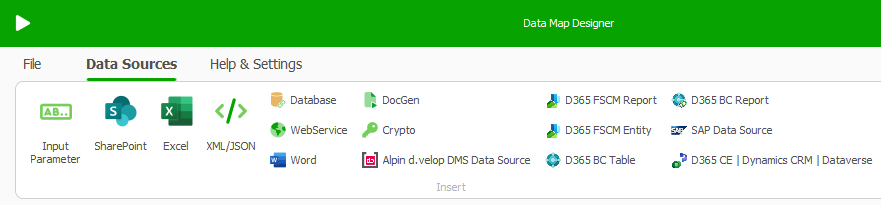
Data Map Designer window
In the Data Sources tab, select one of the available data sources.
The following data sources are included as standard features:
Database
Webservice
Word
DocGen
The following data sources can only be added after purchasing and integrating them into the dox42 Add-In:
Follow the specific instructions provided for each data source. Create a connection between dox42 and the relevant systems to obtain data for your templates.
Result
You now have an overview of available data sources in your Add-In and have started adding a data source to your data map.