You can monitor request statuses, error messages, processing duration and other request processing details in the integration audit log form per D365 FSCM company.
Steps
Go to System administration > Periodic tasks > dox42 integration framework > dox42 integration audit log.

dox42 integration audit log
Trace ID: unify records belonging to one integration request.
Log type:
Execute handler: handler execution log (request processing logic).
Request processing: request processing triggered.
OData action request: OData action request received.
Custom service request: custom service request received.
Button Retry request: allows to rerun the request processing.
Button dox42 audit log: shows related entries in the dox42 audit log.
To configure the error logging tolerance per log type and D365 FSCM company go to System administration > Setup > dox42 > dox42 company parameters.
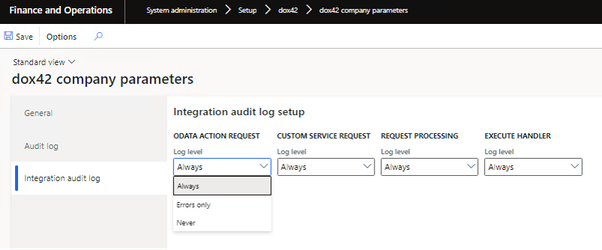
dox42 company parameters
To configure automatic clean-up of old log entries on a periodical basis:
Note
This function runs in context of the current D365 FSCM company.
Go to System administration > Periodic tasks > dox42 integration framework > Cleanup dox42 integration audit log.
In the Days of limitation period enter a desired number to configure that entries older than this number of days are removed.
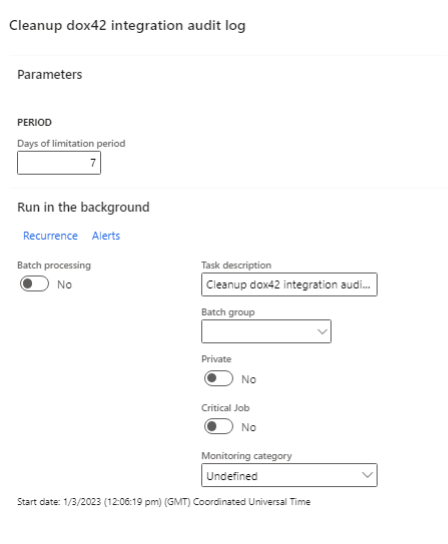
Cleanup dox42 integration audit log
Select OK.